
What Score Does Your LinkedIn Profile Get?
Upload the PDF LinkedIn makes of your profile. We score it out of 100 and quote back the lines that hold it back, with a fix next to each one.
No account, no email and no LinkedIn password. We keep the score, never your profile.
LinkedIn Score
3 fixes found
We judge your headline, key words and top skills against this role. Leave it empty and we'll work it out from your profile, you can change it afterwards.
Drop your LinkedIn PDF here
PDF only, 4 MB max
Choose my PDFWhy a PDF? It lets us read your whole profile without you creating an account or giving us your LinkedIn password.
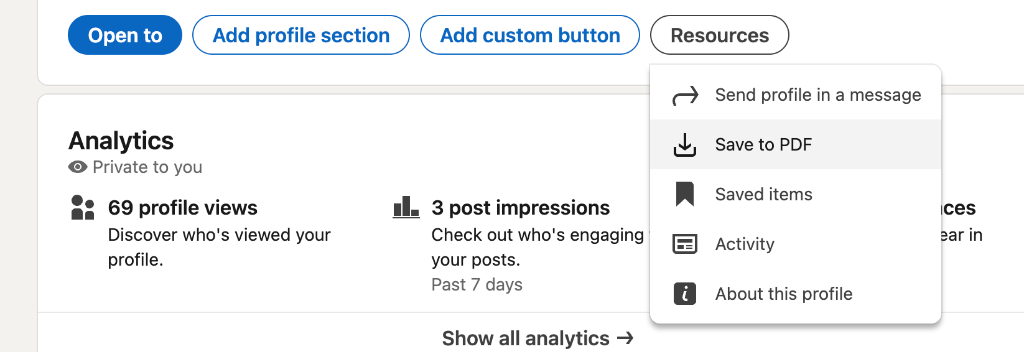
How to export your LinkedIn profile (it's free)
- Go to your LinkedIn profile
- Click the Resources button
- Select Save to PDF
What the Score Checks
Whether your headline, location and key words match what a recruiter types into the search bar.
How your About opens, whether it proves results with figures, and if it says what you want next.
Your recent roles: are they described, and do they show scope and results?
Your top skills, education and languages, and whether they back up the role.
This score reads what a LinkedIn PDF contains. It doesn't see your photo, banner, recommendations or recent posts.
How It Works
Export your profile
Save your profile as a PDF from LinkedIn, on a computer.
Upload it here
Add the role you're aiming for, or let us work it out from your profile.
Fix what we quote
Every finding quotes your own words and puts the fix right next to it.
Frequently Asked Questions
Why a PDF rather than my profile link?
The PDF is your own file, so we can read the whole profile without asking for a password or pulling data from LinkedIn. We only score what you chose to share.
What does the score leave out?
Your photo, banner, recommendations, posts and connections. None of them are in the PDF, so we don't score them and we don't guess.
Do you keep my profile?
No. We read the file to score it and keep only the score, with no text from your profile.
Why can't I export the PDF on my phone?
The LinkedIn app doesn't offer Save to PDF. It only works on linkedin.com, from a computer.